Human-in-the-loop
Pause a run for a person to approve, edit, or reject — then resume it, even days later, from your server.
Some steps shouldn’t run unattended — a draft email before it sends, a refund above a threshold, anything that needs a person’s sign-off. Human-in-the-loop pauses a run at a checkpoint, waits for someone to approve, edit, or reject, then continues down the path they chose.
The Human Review node
Drop a Human Review node where the run should pause. Wire the data to review into its input, write instructions for the reviewer in the config panel, and connect its two outputs — Approved and Rejected — to the paths the run should take in each case. When the run reaches the node, it stops and waits.
In the editor
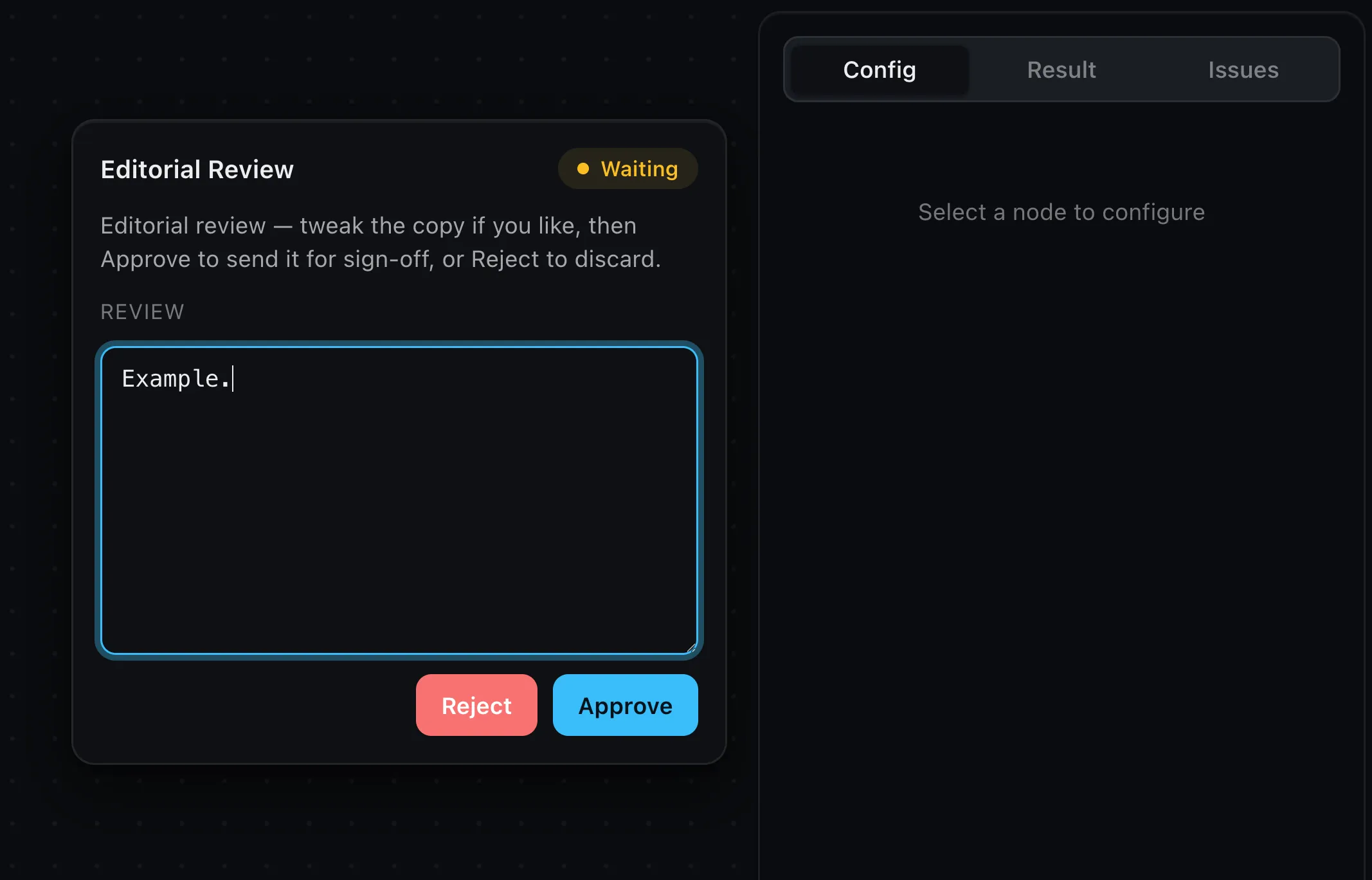
While building, a paused run raises an approval card with your instructions
and the data under review. The reviewer approves it — editing the data first if
they want — or rejects it, and the run resumes down the matching branch. This is
automatic with runInBrowser: there’s
nothing extra to wire.
Persisting and resuming on a server
In production the wait can be long — minutes, or days — so the paused run has to
outlive the request that started it. Run sessions handle that: when a run
suspends, its checkpoint is saved; later, your code resumes it by runId. Build
them once with createRunSessions (from wayflow/runtime).
Give paused runs a place to live
By default run sessions keep checkpoints in memory (fine for development). For
production, pass a CheckpointStore backed by your database — implement four
methods over whatever you already use:
const store: CheckpointStore = {
  save: (runId, record) => db.put(runId, JSON.stringify(record)),
  load: async (runId) => {
    const row = await db.get(runId)
    return row ? JSON.parse(row) : undefined
  },
  delete: (runId) => db.delete(runId),
  list: async () => (await db.rows()).map((row) => JSON.parse(row)),
}

const sessions = createRunSessions(runtime, { store })
Each record is a plain object — the workflow graph plus the run’s state at the
pause (which nodes finished, what they produced, and the review’s instructions and
data) — keyed by runId. It’s just JSON, so any store works: a table, a key-value
row, a document.
Run, pause, resume
Run a graph through the session. If it hits a Human Review node, it returns a
paused outcome instead of a result — the checkpoint is already saved, and you
get the runId and the review details to show a person:
const outcome = await sessions.run(graph, { inputs })

if (outcome.status === 'paused') {
  const { runId, instructions, data } = outcome.suspension
  // the run is saved; surface the instructions and data to a reviewer
}
When that person decides, resume the run by its runId with their decision —
the branch to take, and optionally the edited data:
await sessions.resume({
  runId,
  decision: { branch: 'approved', data: edited },
})
resume continues the run from where it paused and returns the next outcome —
completed, or paused again if there’s another gate ahead. (branch is 'approved'
or 'rejected' — the ReviewBranch type; data falls back to the original
reviewed value if you omit it.) To drop a review without resuming, call
sessions.cancel(runId).
An inbox of what’s waiting
sessions.listPending() returns every run currently awaiting review — each with
its instructions, data, and the run so far — so you can build a “what needs my
sign-off” queue:
const waiting = await sessions.listPending()Driving it from the editor instead
If the reviewer works in the editor itself, you don’t build any of that UI — the
editor’s approval card does it. Point run (from wayflow/runtime/client) at
your run, resume, and cancel endpoints, and it posts the decision for you:
const editor = createWorkflowEditor(element, {
  onRun: ({ inputs, signal }) =>
    run({
      url: '/api/run',
      resumeUrl: '/api/resume',
      cancelUrl: '/api/cancel',
      editor,
      inputs,
      signal,
    }),
})
Your endpoints wrap the same sessions — sessions.stream for the run, and
sessions.resumeStream({ runId, decision }) for the resume — through
streamResponse (see On a server).
Forgot the resume endpoint?
If you wire onRun but leave out resumeUrl, the run pauses and the editor flags
the Human Review node with an error — there’s no way to send the decision back.
That’s your cue to add the resume endpoint and pass resumeUrl.
Surviving a reload
Because the checkpoint lives on the server, a paused review outlives the page. If
someone reloads mid-review, re-attach with attachPending (also from
wayflow/runtime/client) — call it once as the editor loads and it re-shows the
card, redrawing the run so far:
const editor = createWorkflowEditor(element, {
  onReady: () =>
    attachPending({
      pendingUrl: '/api/pending',
      resumeUrl: '/api/resume',
      cancelUrl: '/api/cancel',
      editor,
    }),
})
Your /api/pending endpoint returns sessions.listPending() — the reviews still
waiting (scope them to the signed-in user in a real app).
See it all together
The with-backend example wires this whole flow into one small, runnable app — server sessions, the editor’s run / resume / cancel endpoints, and reload re-attach.
Beyond the node
Pausing is node-type-agnostic. A custom node’s
handler can suspend a run the same way by returning suspend (from
wayflow/runtime):
suspend({ instructions: 'Approve before sending', data: draft })It’s checkpointed, surfaced, and resumed exactly like the Human Review node.
Where next
- On a server — the run/resume endpoints these sessions plug into
- Persistence & autosave — storing the workflow itself, separate from its in-flight runs
- Custom node types — build your own pausing step