Mental model
How the pieces of Wayflow fit together — the editor, the runtime, and the one graph that connects them. Hold this picture and the rest of the docs fall into place.
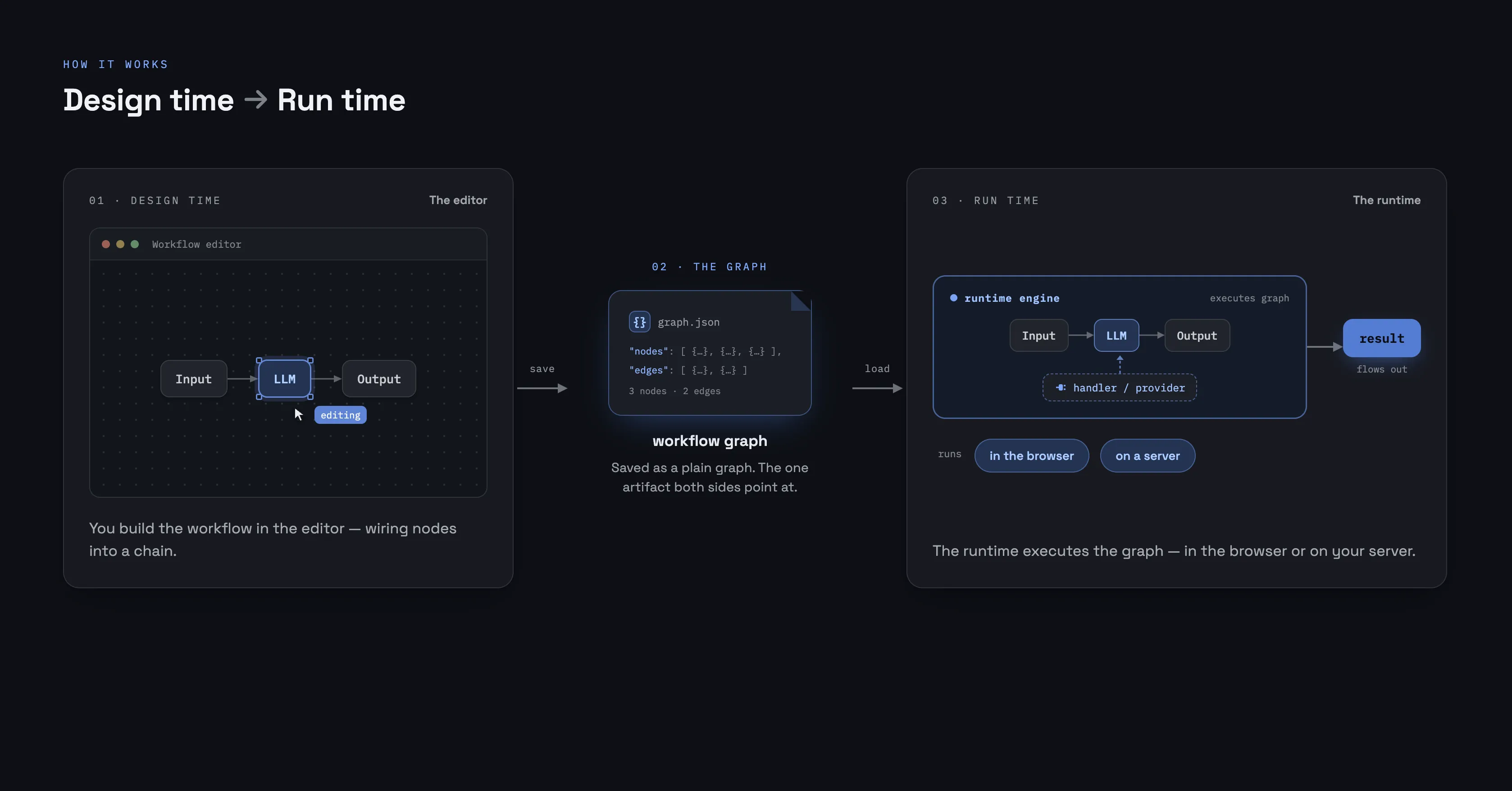
Most of these docs zoom in on one node, one option, one task. This page does the opposite — it’s the shape of the whole thing. There’s really one idea to hold: you build a workflow in the editor, a separate runtime executes it, and the only thing passing between them is a plain graph. Once that clicks, headless runs, saving to your own database, and running on a server all stop being surprising.
Design time and run time
Wayflow has two halves, and they’re cleanly separated.
- The editor is design time. It’s a UI for shaping a graph — arranging nodes on a canvas, wiring them together, configuring each one. On its own it doesn’t call your models or execute anything.
- The runtime is run time. It takes a finished graph and runs it: visiting nodes, flowing data along the edges, calling the handlers you registered. It has no UI and doesn’t depend on the editor at all.
They meet at the graph — the workflow itself, as data. The editor produces it; the runtime consumes it. When you press Run in the editor, that’s just the editor handing its graph to a runtime; on a server, a runtime runs the very same graph with no editor in sight.
A workflow is a graph
A graph is just nodes and edges. Each node holds its configuration and exposes typed ports — inputs on one side, outputs on the other. An edge joins one node’s output port to another’s input port, and that’s how a value produced by one node reaches the next. The node pages in Building workflows are each a tour of one node’s ports and config.
The editor edits this graph. The runtime walks it. Nothing more exotic is going on underneath — which is what makes the next part true.
The graph is just data
Because a workflow is plain data, it’s portable. editor.getGraph() hands you
the graph; serialize turns it into a JSON string and deserialize brings it
back — both from wayflow/core:
import { serialize, deserialize } from 'wayflow/core'

const json = serialize(editor.getGraph()) // store this string anywhere
const graph = deserialize(json) // …and read it back into a graph
That JSON is yours to do anything with — save it to a database, write it to a file, version it alongside your code, send it between client and server. Load it back into an editor to keep editing, or hand it straight to a runtime to run:
const outcome = await runtime.run(deserialize(json), { inputs })The same artifact, two consumers — and no hidden state tucked away somewhere else. That’s why a workflow built in one place runs anywhere: it’s just a graph you can move around. Wiring up automatic saving and loading is covered in Persistence & autosave.
Built in layers
You can live entirely at the top — one createWorkflowEditor call, one
createRuntime — and never think about what’s beneath. When you need more, each
layer below is a real surface you can drop down to:
- core — the graph primitives (nodes, edges, viewport, history)
- dom — the canvas and editor surface
- agent — workflow node types and the handler API
- runtime — the execution engine
- models — provider-neutral LLM and image adapters
- ui — the editor and its design-system primitives
Most apps never reach past the top. But custom node types and the runtime API are right there the moment you outgrow the defaults — you’re never blocked.
Where next
- Quickstart — see the whole loop end to end
- Where workflows run — the runtime, in the browser or on a server
- Providers & models — connect a model so the AI nodes can run