Custom result rendering
The Result tab renders a run's output field by field, typed. When you want richer output — markdown, a link, your own widget — two hooks let you take over how a field is shown.
When a node finishes, the Result tab shows what it produced — each output field
by name, rendered for its type. Strings and numbers show as text, objects and lists
as a collapsible JSON tree, and an image field as an actual <img>. For most
workflows that’s all you want, and this page isn’t needed.
It’s here for when a field deserves better than the default — a model’s reply shown
as formatted markdown instead of a wall of text, a URL as a clickable link, a
score as a little bar. Two options on createWorkflowEditor let you step in.
Markdown
The most common case: an LLM field comes back as markdown, and you want it rendered
rather than shown raw. The editor doesn’t ship a markdown parser — you bring one and
pass it as renderMarkdown:
import { marked } from 'marked'

createWorkflowEditor(element, {
  renderMarkdown: (md) => marked.parse(md),
})
renderMarkdown takes the raw string and returns HTML (a string or an element).
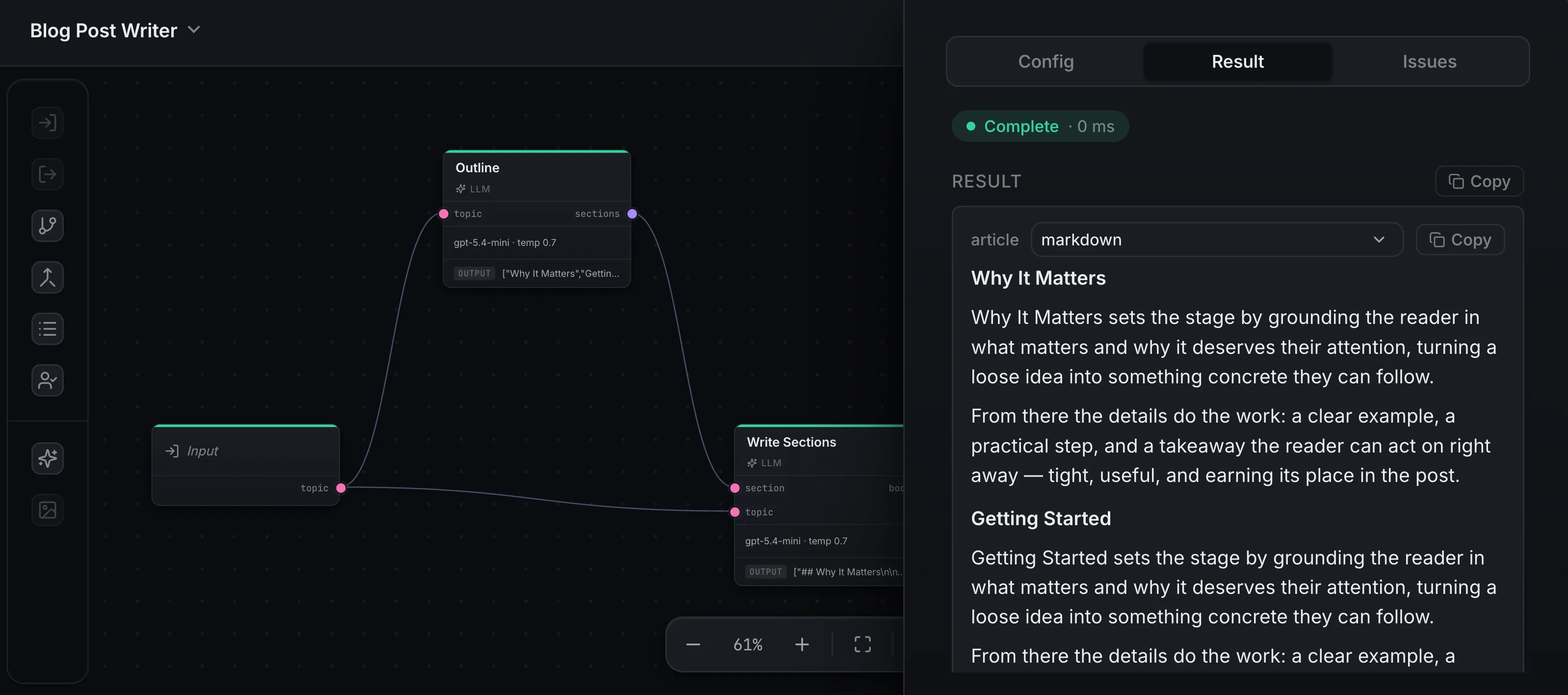
Once it’s set, string fields gain a small format switch in the Result tab —
flip a field to markdown and its value renders through your parser. Without
renderMarkdown, that option isn’t offered and strings stay plain text.
Any field, your way
For full control, renderResultField is called for each output field and decides how
its value is shown:
createWorkflowEditor(element, {
  renderResultField: (value, field) => {
    if (field.name === 'url') {
      const link = document.createElement('a')
      link.href = String(value)
      link.textContent = String(value)
      return link
    }
    // return nothing for everything else — it keeps the default
  },
})
It receives the field’s value and a field descriptor — its name, its
dataType, and the current display format. What you return decides the rendering:
- an element is shown as-is,
- a string is shown as plain text,
- nothing (
undefined) falls back to the default, so you only handle the fields you care about and leave the rest alone.
This is the escape hatch for anything the built-ins don’t cover — a data table, a chart, a status badge, a download button.
What renders, and in what order
For each field the editor tries renderResultField first, then its built-ins
(markdown for a markdown-format string, <img> for an image field), then the
default typed view. So renderResultField always wins when it returns something,
and you can lean on the built-ins for everything you don’t override.
You own sanitization
Both hooks hand their output straight to the page — the element you return is
inserted as-is, and the HTML from renderMarkdown is set directly. The editor does
not sanitize it. If a field can carry untrusted content, run it through a sanitizer
(or configure your markdown parser to) before returning.
Where next
- Editor modes — the Result tab is
front and center in
previewmode - Structured output — give a node typed output fields for the Result tab to render
- Theming — match the editor’s colors to your brand