Map & arrays
Work with lists — run a node once per item, and reshape lists with filter, sort, count, and more.
Workflows often deal with lists — fifty support tickets, a dozen search results, a handful of file names. Two tools handle them: map a node over a list to process every item, and the Array Operations node to reshape a list as a whole.
Map a node over a list
The LLM and Image Generation nodes — and custom nodes — can run once per item over a list instead of a single time. Turn on Run per item in the node’s config panel, feed it a list, and Wayflow runs the node for every item, then collects the results back into a list in the same order.
So “summarize this ticket” becomes “summarize each of these fifty tickets” by flipping one switch. The items run concurrently, so it’s fast.
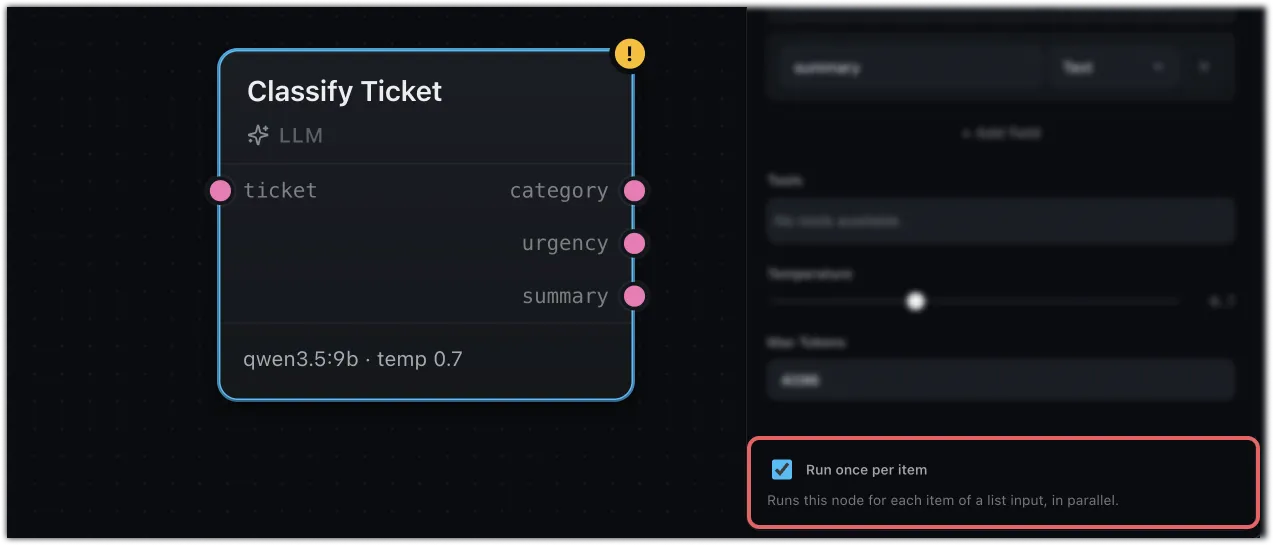
A mapped node takes a single list input. If you need to combine several lists first, do it upstream with a Merge in Zip mode.
The Array Operations node
Where map runs a whole node per item, the Array Operations node reshapes a list in one step. Connect a List, pick an Operation in the config panel, and the Result comes out the other side.
Some operations reduce the list to a single value:
- Count — how many items there are
- Sum — add up numbers
- Join — glue the items into one string, with a separator you choose
- First / Last — the first or last item
The rest return a new list:
- Filter — keep only items that match a comparison (the same operators as Conditional)
- Sort — order the items, ascending or descending
- Unique — drop duplicates
- Take — the first few items
- Slice — a range, from a start index to an end
- Pluck — pull one field out of each item (a list of
{ name }objects becomes a list of names)
They compose
These pieces are made to stack. Filter a list down to what matters, map an LLM over what’s left, then Merge the results back together with Zip — that’s the shape of a real batch workflow like ticket triage.
Where next
- LLM — the node you’ll most often map
- Merge — Zip mapped results back into one list
- Conditional — Filter shares its operators